Enlarger Configuration#
The Printalyzer Timer supports a wide variety of configuration options for photographic enlargers. While the most common cases will be covered under the default settings, it is still highly recommended to add a custom profile and to perform the Timing Calibration process as described below.
Enlarger List#
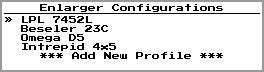
Fig. 13 Enlarger Configuration List#
The Enlarger Configuration menu opens with a list of all configured enlargers. To add a new enlarger, select the the “Add New Profile” option. To change the active enlarger, highlight it and press the  button.
Enlarger Settings#
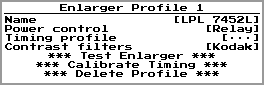
Fig. 14 Enlarger Profile Settings#
Parameter |
Description |
|---|---|
Name |
Name of the profile, used for reference within the menus |
Power control |
Relay - Enlarger controlled via the relay switched outlet, as described in the Relay Control section below
DMX - Enlarger controlled via DMX, as described in the DMX Control section below
|
Timing profile |
Specific timing characteristics of this enlarger, as described in the Timing Calibration section below. |
Contrast filters |
The type of filtration this enlarger is setup to use for determining contrast on multigrade printing paper. This value is used to provide reference numbers on the device home screen during the printing process.
Regular - Typical set of Ilford/Kodak style numbered contrast filters
Durst (170M) - Dichroic color head, Durst-style, 170M max [1]
Durst (130M) - Dichroic color head, Durst-style, 130M max [1]
Kodak - Dichroic color head, Kodak-style [1]
Focomat V35 - Dichroic color head, Leitz Focomat V35 [1]
Meopta - Dichroic color head, Meopta [2]
(Not shown shown when DMX control is enabled)
|
** Test Enlarger **
Bring up a screen for testing the current enlarger configuration.
The
 button is then used to toggle the enlarger on and off, while the button is then used to toggle the enlarger on and off, while the  button leaves this screen. button leaves this screen. |
** Calibrate Timing **
Start an automated process to measure the on/off timing behavior of your enlarger, as described in the Timing Calibration section below.
|
** Delete Profile **
Delete this enlarger profile.
|
Relay Control#
The simplest and most traditional method of controlling a photographic enlarger is via relay control. This method simply switches power to the “Enlarger” outlet on the rear of the Printalyzer Enlarging Timer. Some enlargers use this as a direct power source for their lamp, while others use it as a control signal for their own power supplies.
The only additional setting in this mode is the “Contrast filters” setting. If set to “Regular,” then it is assumed that you will be using standard numbered contrast filters in the light path. If it is set to one of the other options, recommended equivalent settings for each contrast grade will also be shown on the device as a reference. This is especially useful when using the dichroic filter adjustments on a color enlarger in lieu of separate contrast filters.
DMX Control#
For enlargers with non-traditional control mechanisms, a DMX512-compatible expansion port is provided by the Printalyzer Enlarging Timer. This allows interfacing to off-the-shelf DMX controlled LED drivers, as well as DMX controlled adapters that can be user provided for interfacing with a wide variety of manufactured and DIY enlargers.
The specific settings for this feature are still under development, especially in areas of value mapping and presets for contrast control and color printing. The options available here will be expanded over time alongside user needs and requests.
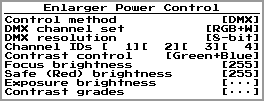
Fig. 15 Enlarger DMX Control Parameters#
Parameter |
Description |
|---|---|
DMX channel set |
White - Single white light channel
RGB - Separate red, green, and blue channels
RGB+W - Separate red, green, blue, and white channels
|
DMX resolution |
8-bit - Single channel ID per light color, giving a value range of 0-255
16-bit - Two adjacent channel IDs per light color, giving a value range of 0-65535
Note: 16-bit control is highly recommended, if your hardware can support it, as it allows for much finer adjustments with contrast control and color printing.
|
Channel IDs |
The DMX channel IDs corresponding to each light color |
Contrast control |
None - Printing will always use white (or white-equivalent) light, expecting contrast to be controlled via external filters
Green+Blue - Printing will use a configurable mixture of green and blue light colors to achieve each contrast grade
|
Focus brightness |
Brightness value used for the white (or white-equivalent) light when in focus mode |
Safe (Red) brightness |
Brightness value used for the red light when the enlarger is on but not exposing paper
(This feature is only shown if your enlarger has a red light source, and is intended to be used as a convenience feature in-between test strip and burn/dodge exposures.)
|
Exposure brightness |
Brightness value used to comprise the white (or white-equivalent) light used for print exposure without internal contrast control
(This feature is only shown with the “White” channel set or the “None” contrast control setting)
|
Contrast grades |
Red/Green brightness values used for each contrast grade
(This feature is only shown if the channel set includes green and blue, and contrast control is set to “Green+Blue”)
|
Timing Calibration#
Photographic enlargers are not instantaneous sources of light. They always take some amount of time to turn on and off. The amount of time can vary dramatically depending on what sort of lamp the enlarger uses, and how that lamp is controlled. Some enlargers respond very quickly, while others do not.
The Printalyzer Enlarging Timer has the ability to characterize and compensate for this behavior. By taking this extra step, accuracy and repeatability of exposures can be dramatically improved. The impact of this is especially noticeable on short exposures, such as with incremental test strips and burn/dodge adjustments.
The following graph illustrates the events that occur during an exposure, thus illustrating the problem:
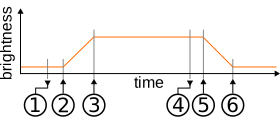
Fig. 16 Enlarger Brightness Timeline#
|
Turn On Event
The enlarger is commanded to turn on, by either toggling the control relay or via a DMX signal
|
|
Brightness Rising
The enlarger light begins turning on
|
|
Full Brightness
The enlarger light has reached full intensity
|
|
Turn Off Event
The enlarger is commanded to turn off, by either toggling the control relay or via a DMX signal
|
|
Brightness Falling
The enlarger light begins turning off
|
|
Enlarger Completely Off
The enlarger is completely dark
|


To characterize this behavior for better exposures, several parameters are measured and stored as a “timing profile” within the enlarger’s configuration. These parameters are as follows:
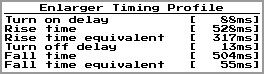
Fig. 17 Enlarger Timing Parameters#
Parameter |
Description |
|---|---|
Turn on delay |
The time from when the enlarger is commanded to turn on until the light level starts to rise |
Rise time |
The time from when the light level starts to rise until it reaches full brightness |
Rise time equivalent |
The duration of full brightness enlarger light that would produce an equivalent exposure to the rise period |
Turn off delay |
The time from when the enlarger is commanded to turn off until the light level starts to fall |
Fall time |
The time from when the light level starts to fall until the enlarger is completely off |
Fall time equivalent |
The duration of full brightness enlarger light that would produce an equivalent exposure to the fall period |
While these parameters can be set manually, they are typically set via the enlarger timing calibration process. To perform the timing calibration, do as follows:
Adjust the enlarger head to maximize brightness
Select the “Test Enlarger” menu option on the enlarger configuration screen and turn on the enlarger
Lower the head to a height similar to what you would use for a 5x7” print
Fully open the lens aperture
Roughly focus the enlarger
Turn off the enlarger
Make sure the Meter Probe is connected and place its sensor in the middle of the frame
Select “Calibrate Timing” and follow the prompts
This process will then run the enlarger through a series of automated on/off cycles while measuring its light output, and calculate the timing profile.
Footnotes