
Paper Profiles#
Introductory Theory#
Printing paper profiles attempt to capture the characteristic curve of photographic printing paper, as it is defined in ISO 6846:1992(E). This curve represents the relationship between light exposure, on a logarithmic scale, and visual reflection density of the resulting processed paper.
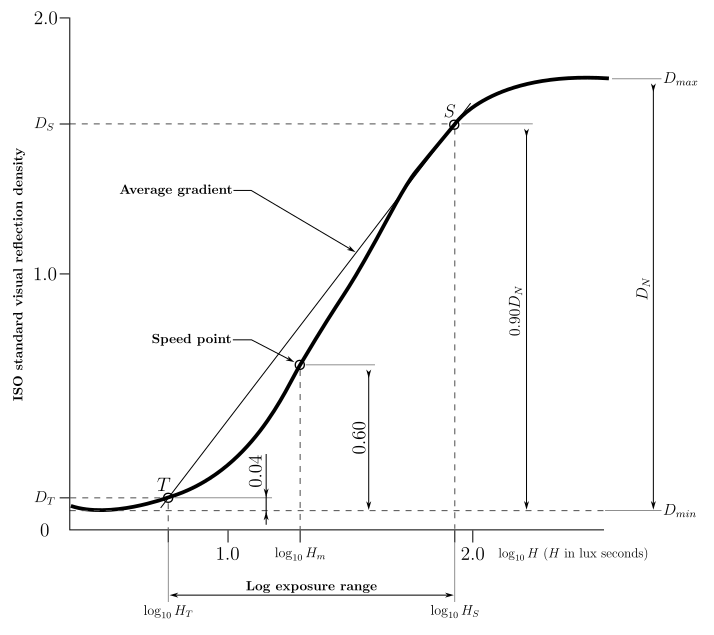
Fig. 19 Printing Paper Sensitometric Curve#
The curve itself is defined by the following parameters, which are captured within the paper profile settings:
Parameter |
Description |
|---|---|
\(D_{min}\) |
Minimum density of the printing paper |
\(D_{max}\) |
Maximum density of the printing paper |
\(\log_{10} H_{T}\) |
Light exposure to produce a density of \(D_{min} + 0.04\), which is 0.04 above the paper base |
\(\log_{10} H_{m}\) |
Light exposure to produce a density of \(D_{min} + 0.60\), which is 0.60 above the paper base and otherwise known as the “speed point” of the paper |
\(\log_{10} H_{S}\) |
Light exposure to produce a density of \(0.90 \cdot D_{N}\), which is 90% of the paper’s max net density.
The max net density is defined as \(D_{N} = D_{max} - D_{min}\).
|
\({ISO(R)}\) |
The paper’s contrast range, which is defined as:
\(R = 100 \cdot (\log_{10} H_{S} - \log_{10} H_{T})\)
|
For all the above parameters, the light value \(H\) is in lux-seconds. Within individual printing profiles, and the entire profile calibration process, a unit called the PEV (“Print Exposure Value”) is used. It is defined as \(PEV = 100 \cdot \log_{10} H\) which is effectively the same unit that is used as the basis for ISO(R). It was chosen as a compact, convenient, and user friendly way of encapsulating an amount of light paper is exposed to.
Because most photographic printing papers are now multigrade, each filtered contrast grade has its own characteristic curve and thus requires a separate set of \(H\) numbers.
Profile List#
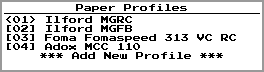
Fig. 20 Paper Profile List#
On the list of paper profiles, each profile has a number. The currently active profile is denoted by its number being surrounded by angle brackets (i.e. “<01>”), and its number is also shown in an icon on the home screen.
To change the currently active profile, highlight a profile and press the  button.
Profile Properties#
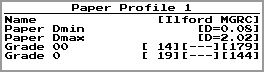
Fig. 21 Paper Profile Properties#
The top level properties of a paper profile consist of the following:
Name |
Name of the profile, used for reference within the menus |
Paper Dmin |
The minimum density of the paper, otherwise known as the density of the paper base |
Paper Dmax |
The maximum density of the paper |
Grade 00..5 |
The profile settings for each grade, which are shown as three numbers:
\(D_{min} + 0.04\) in PEV units
\(D_{min} + 0.60\) in PEV units
\({ISO(R)}\), the paper’s contrast range
Selecting this item will take you to a screen for setting grade-specific properties.
|
Grade Properties#
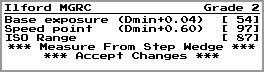
Fig. 22 Paper Profile Grade Properties#
Base exposure |
\(D_{min} + 0.04\) in PEV units |
Speed point |
\(D_{min} + 0.60\) in PEV units |
ISO Range |
\({ISO(R)}\), which is the contrast range of the paper |
Measure From Step Wedge |
Launches a utility for calculating these numbers from the density measurement of a step wedge exposure |
Step Wedge Measurement#
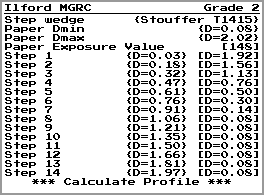
Fig. 23 Step Wedge Exposure Measurement#
Step wedge |
Name of the configured step wedge used for the exposure |
Paper Dmin |
The minimum density of the paper, shown for reference |
Paper Dmax |
The maximum density of the paper, shown for reference |
Step 1..N |
The measurements of each patch of the step wedge, as exposed onto the printing paper:
The first number is the density of the step wedge patch itself, shown for reference.
The second number is the measurement of the area of paper onto which this patch has been exposed.
These two columns of numbers should run in oppose directions.
|
Calculate Profile |
Performs calculations based on the above data |
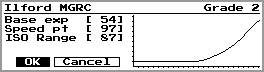
Fig. 24 Step Wedge Exposure Calculation#
This shows the results of profile calculation, along with a graph of the paper’s characteristic curve. Select OK to accept these values.