
Safelight Configuration#
It is generally useful to have your safelights turned on while moving around your darkroom, but turned off during certain operations such as focusing, print exposure, and print metering.
To help with this, the Printalyzer Enlarging Timer has the ability to control your darkroom safelights. This is especially important because your safelights must be turned off whenever using the meter probe to take accurate readings of light projected onto your enlarger baseboard.
To help with this, the Printalyer Timer offers several safelight modes which are described below.
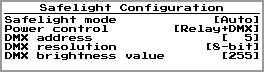
Fig. 18 Safelight Configuration Parameters#
Parameter |
Description |
|---|---|
Safelight mode |
Off - Safelight is always off
Enlarger - Safelight is normally on, but turned off when the enlarger is on
Meter/Print - Safelight is normally on, but is turned off when taking meter readings and during print exposures
Metering - Safelight is normally on, and is only turned off when taking meter readings
|
Turn off delay |
Amount of time to wait, after commanding the safelights to shut off, before it is safe to take readings with the meter probe. This is to compensate for the fact that safelights do not respond instantly, and it may need to be adjusted to find the ideal value.
This value is only relevant when using a safelight mode that automatically turns the safelights off and on as part of a taking a meter reading.
|
Power control |
Relay - Safelight controlled via the relay switched outlet
DMX - Safelight controlled via DMX
Relay+DMX - Safelights controlled via both the relay switched outlet and DMX
|
DMX address |
The DMX channel ID corresponding to the safelight
(Only shown when DMX safelight control is enabled)
|
DMX resolution |
8-bit - Single channel ID for the safelight, giving a value range of 0-255
16-bit - Two adjacent channel IDs for the safelight, giving a value range of 0-65535
(Only shown when DMX safelight control is enabled)
|
DMX brightness value |
Brightness value used for turning on the safelight
(Only shown when DMX safelight control is enabled)
|
** Test Safelights **
Bring up a screen for testing the current safelight configuration.
The
 button is then used to toggle the safelights on and off, while the button is then used to toggle the safelights on and off, while the  button leaves this screen. button leaves this screen. |
** Measure Off Delay **
Start an automated process to measure the response time of your safelights, to try and figure out an appropriate value for the Turn off delay setting above.
Note: Not all safelights have predictable and repeatable timing, so the resulting time from this feature should be used with caution.
|
Note
If your safelights are inconsistent with their on/off behavior or timing, as can happen with LED power supplies or radio triggers, then the “Enlarger” safelight mode is likely the safest one to use. Having the safelights on during metering, even for an imperceptibly short amount of time, can lead to inaccurate readings.