Printing Mode#
Printing Mode (sometimes called “B&W Printing Mode”) is the main mode of the Printalyzer Timer.
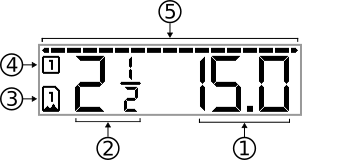
Fig. 7 Printing Mode Display#
|
Exposure Time
The current print exposure time. If the exposure button is pressed, the enlarger will turn on for this number of seconds.
|
|
Contrast Grade
The selected contrast grade used for calculating the tone graph. Depending on your enlarger configuration, a guide to color filter settings may appear below it. You still need to actually put the filtration corresponding to this number into your enlarger before performing a print exposure.
|
|
Paper Profile
The selected paper profile, used in combination with the selected contrast grade for calculating the tone graph.
|
|
Burn/Dodge Areas
The number of burn/dodge areas that have been configured for the current print.
|
|
Tone Graph
The tone graph, which plots the meter readings taken for the current print.
|


Changing Stop Increment#
To change the stop increment used for all functions in printing mode, simultaneously press the  and
and  buttons and then release.
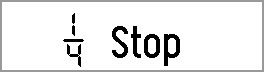
Fig. 8 Stop Increment Adjustment#
You can then use the and buttons individually to cycle through the choices, and press  when finished.
Creating Test Strips#
To create a test strip, press the  button to enter test strip mode.
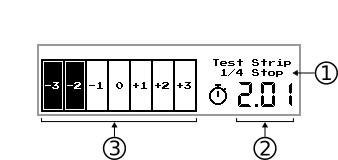
Fig. 9 Test Strip Creation Display#
|
Stop Increment
The stop increment used for each subsequent patch of the test strip.
|
|
Next Exposure Time
The exposure time to be used for the next step of test strip creation.
|
|
Test Strip Overview
Shows the layout of the test strip, and which patches should be covered before the next exposure.
|
The number of patches in a test strip, and whether the strip is created using incremental or separate exposures, can be configured in the device settings menu.
Burn/Dodge Adjustments#
To add a burn/dodge adjustment, press the  button. Long-press this button to see and modify the list of already-added burn/dodge adjustments.
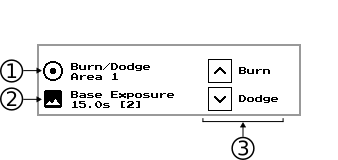
Fig. 10 Add Burn/Dodge Adjustment Display#
|
Area to Add
The number of the next burn/dodge area to add, or the details of the area being added.
|
|
Base Exposure
The time and contrast grade for the base exposure.
|
|
Adjustment to Add
Press
to add a burn adjustment.Press
to add a dodge adjustment.Once pressed, this changes to show the stop increment being added or subtracted.
|